Use-case descriptions
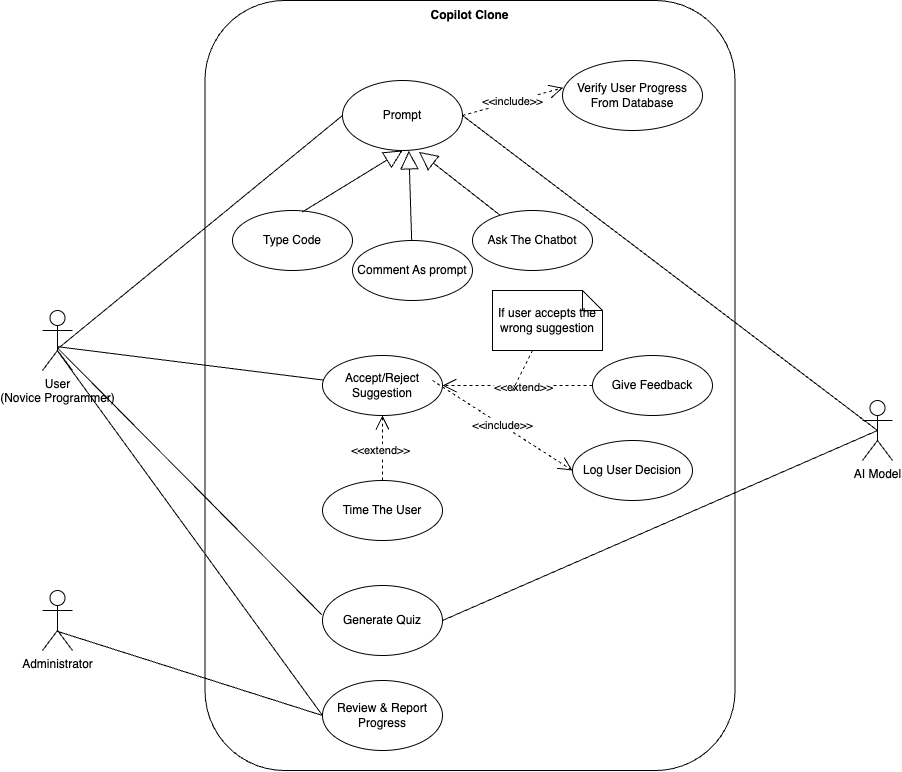
Figure 1. UML Use Case Diagram of the Github Copilot Clone application.
Actors
Our project has multiple actors, meaning that different use cases are needed to describe how each actor interacts with the system.
- User (beginner programmers): Student learning to program, interacting with our Copilot VS Code Extension for code suggestions and asking questions about concepts.
- AI Model: The AI model running on our system that will create code suggestions, answer concept questions, and generate quizzes.
- Administrator: An instructor that wants to monitor students' progress and review logged data from the system to identify concepts that should be reviewed.
Use Cases
Use Case 1: Receiving Context-Aware Code Suggestions
Actors: User, AI Model
The user wants to get inline code suggestions to assist with a coding assignment and determine if it is correct or incorrect.
- User begins typing code.
- AI model analyzes the context of the code and creates a code suggestion (incorrect or correct).
- System displays the AI model suggestion.
- User reviews the suggestion and determines if it is correct or not.
- User selects “Accept” if they think the code is right or “Reject” if they believe it is wrong.
- System logs the user’s choice, time it took for the user to make a decision, and whether or not it was correct.
- If the user accepts an incorrect suggestion, the AI model gives an explanation of the mistake.
Use Case 2: Logging Decision Time for Code Suggestions
Actors: User, AI Model
The system has to track how long a user takes to accept or reject a suggestion to ensure the user is actually engaging with the code.
- System begins a timer when it suggests code to the user.
- User reviews the suggestion (as quickly or slowly as they want).
- User accepts or rejects the suggestion.
- System stops the timer and logs the response time.
- If the user consistently makes quick and random wrong selections, the system flags them for potential disengagement or lack of knowledge on the subject matter.
Use Case 3: Receiving Feedback After Selecting a Suggestion.
Actors: User
The user wants to receive feedback on whether they correctly identified a suggestion as right or wrong.
- User accepts or rejects a suggestion.
- System determines if the user's choice was correct.
- If the user chooses correctly, system provides confirmation.
- If the user chooses incorrectly, system provides an explanation of the mistake.
- System logs the mistake for admin review.
Use Case 4: Tracking and Logging User Decisions
The system has to track user engagement, correctness, and common errors.
- System logs each accepted or rejected code suggestion.
- System tracks if the choice was correct or incorrect.
- System records how long the user took to decide on accepting or rejecting.
- If user frequently accepts incorrect suggestions, system logs recurring mistakes for admin review.
- If multiple users make the same mistakes, system flags the concept as a struggle area.
Use Case 5: Generating Learning Reports for Administrators
Actors: AI Model, Administrator
System compiles the user data into a detailed report for instructors.
- AI Model will keep track of the users selections on different code prompts.
- The user's performance data will be placed into a formatted dashboard for the instructor.
- Report will show percentages for the users answers to the code suggestions that were either correct or incorrect.
Use Case 6: AI Generated Quiz Based off Previous Topics
Actors: User, AI Model
The AI Model will supply the user with a quiz on topics that were in the previous code suggestions.
- AI Model will determine which areas students need most improvement in based off of their learning reports.
- AI Model generates the quiz and makes it available to the users.
- The User takes a new quiz every week.
- AI Model tracks correct and incorrect quiz responses and makes results available to both the user and the administrator.
- The User can view their results as well as a review on why they answered incorrectly on some questions if necessary.